 AIFind
DrawSQL Review 2026: Database Diagrams With AI
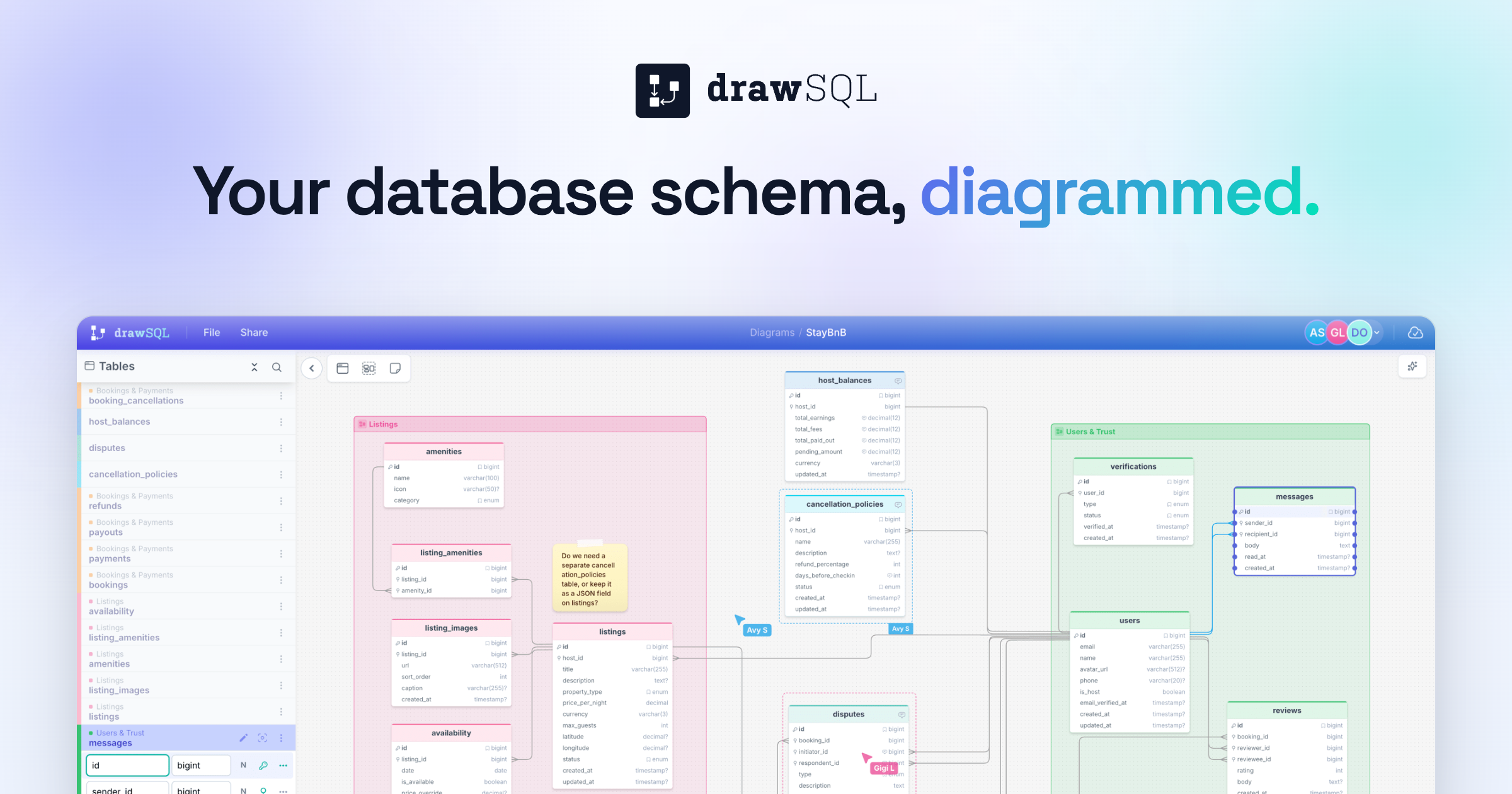
DrawSQL is a database schema diagram tool that turns pasted SQL into a shareable diagram, adds AI to review and generate schema changes, and supports real-time team editing. A free plan covers public diagrams of up to 15 tables, and paid plans start at $19 a month. It suits developers and engineering teams who document or plan databases.
What Is DrawSQL?
DrawSQL is a visual schema designer for teams that want a diagram they can keep current. You paste CREATE TABLE statements, DBML or an AI-assisted import and get a diagram with tables, columns and relationships. Large schemas stay readable with table groups, sticky notes and auto layout, and 200+ templates cover common patterns such as multi-tenant SaaS, e-commerce, CRM and billing.
DrawSQL AI works directly on the schema rather than in a separate chat. It can review the diagram for missing indexes and inconsistent naming, generate new tables and relationships from a description, and show a diff before you apply any change. A free editor needs no account, so you can try the import before signing up.
Key Features
- Import from SQL, DBML and your AI assistant
- Table groups, sticky notes and auto layout
- DrawSQL AI to review, generate and diff schema changes
- Real-time multiplayer editing with discussion threads on a table
- Export SQL for MySQL, PostgreSQL and SQL Server, Laravel migrations, JSON and images
- Version history to compare earlier schema states
- Live embeds for Notion, Confluence or any page that supports embeds
- API access on paid plans
How a Schema Review Runs
- Paste your CREATE TABLE statements, upload DBML or start from a template.
- Group tables by domain, such as auth, billing and product.
- Ask DrawSQL AI to review the schema, then read the diff.
- Invite teammates and discuss a table in a thread until it is resolved.
- Export SQL or Laravel migrations, or embed the live diagram in your docs.
DrawSQL Pricing (2026)
| Plan | Price | Private diagrams | Tables per diagram | Users | Highlights |
|---|---|---|---|---|---|
| Free | $0 | None, public only | 15 | 1 | Unlimited public diagrams |
| Starter | $19/mo or $171/year | 10 | 50 | 1 | DrawSQL AI (500 credits a month), export, version history, API access |
| Growth | $59/mo or $531/year | Unlimited | 100 | Up to 5 | Real-time multiplayer |
| Large | $179/mo or $1,790/year | Unlimited | Unlimited | Up to 25 | Everything in Growth |
| Enterprise | Custom | Unlimited | Unlimited | Unlimited | SSO and SAML, audit trail, priority support |
Yearly billing saves three months on Starter and Growth and two months on Large. You can try DrawSQL here.
Pros and Cons
Where it holds up: importing SQL gives you a readable diagram in seconds, the AI review works on the schema in context, and export covers SQL for three databases plus Laravel migrations. The free plan and 200+ templates make it easy to start, and live embeds keep documentation current.
Where it falls short: free diagrams are public only and capped at 15 tables, so private work needs a paid plan. Real-time editing starts on Growth at $59 a month, Starter is a single-user plan, and DrawSQL AI is limited to 500 credits a month. Table limits of 50 on Starter and 100 on Growth can be tight for very large schemas.
Who Should Skip This
If your schema is small and private, a text-based tool or a free public diagram may be enough. If you need diagrams generated straight from a live database connection, check what DrawSQL imports before you pay, since its import works from SQL and DBML. And if you already keep documentation in a tool that renders diagrams for you, a separate editor adds one more place to maintain.
Similar Tools Available on AIFind
For other developer tooling, see Context.dev for a web data API for AI agents, Novita AI for model APIs and GPUs, and Latenode for automation with JavaScript. For documentation from screen recordings, see Glitter AI. Browse the Best AI Tools for Engineering and Product Teams and Best AI Tools With a Developer API collections.
FAQ
Is DrawSQL free? Yes. The free plan includes unlimited public diagrams of up to 15 tables for one user. Private diagrams need a paid plan from $19 a month.
How do I import an existing database? Paste CREATE TABLE statements to import from SQL. DrawSQL also offers DBML to ERD and an AI-assisted import.
What can I export? SQL DDL for MySQL, PostgreSQL and SQL Server, Laravel migrations, JSON and images. Export is available on paid plans.
Does DrawSQL support real-time collaboration? Yes, on the Growth plan and above. Teams edit the same diagram together and can leave discussion threads on a table.
What does DrawSQL AI do? It reviews a schema for missing indexes and naming problems, generates tables and relationships from a description, and shows a diff before changes are applied. Starter, Growth and Large include 500 AI credits a month.
This page may contain affiliate links — AIFind may earn a commission if you sign up through them, at no extra cost to you. See our affiliate disclosure for details.

Paul
Founder & Editor, AIFind
Paul is an experienced Human Resources professional with a background in applying technology, data analytics, and workflow optimization to HR management. Outside his corporate HR career, he's a seasoned content creator and digital entrepreneur: he built a YouTube channel to 60,000+ subscribers over 10 years, ran a print-on-demand e-commerce business on platforms like GearBubble, and actively uses AI tools and automation in both his own projects and enterprise work — the hands-on experience behind AIFind's tool research and reviews.