 AIFind
SendShort Review 2026: Long Videos to Captioned Shorts
SendShort is an AI short-form video tool that turns long videos and YouTube links into captioned shorts, with animated subtitles in 100+ languages, B-roll, hook titles and a TikTok and YouTube scheduler. Plans cost $15, $23 and $47 a month billed yearly, with long-video clipping starting on Professional. It suits creators and agencies who post shorts daily.
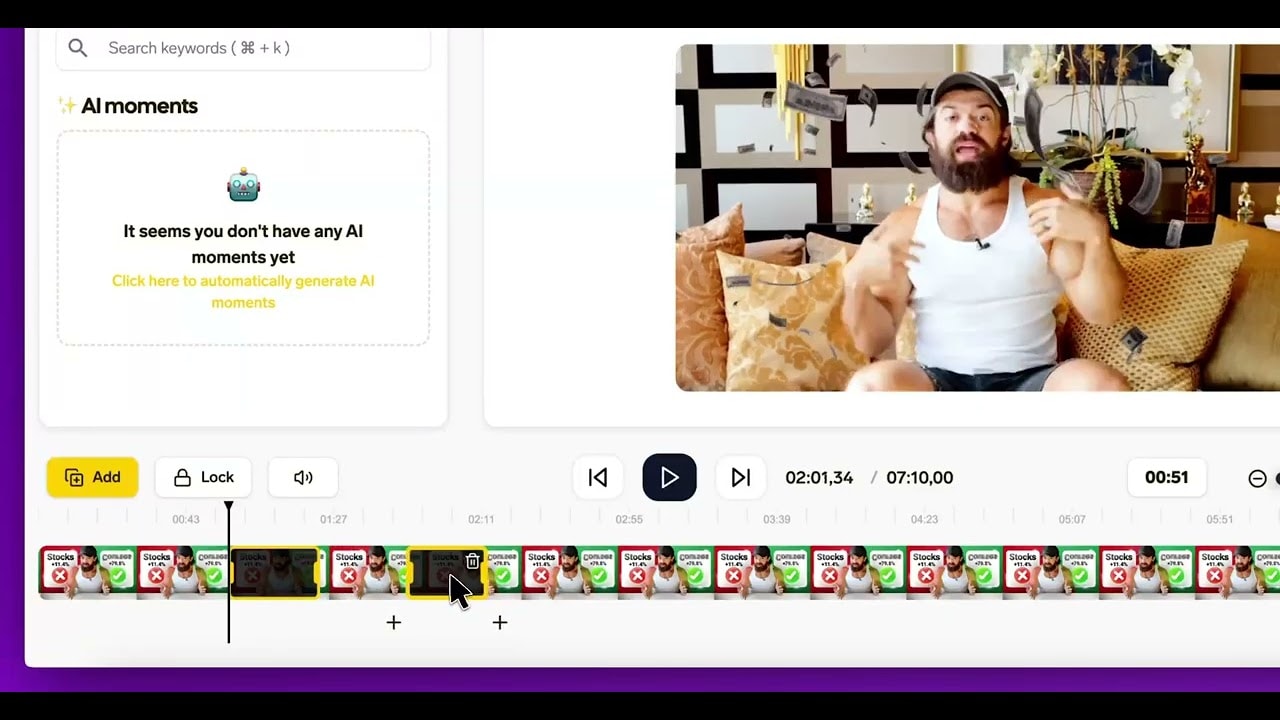
What Is SendShort?
SendShort takes a video file or a YouTube link and builds short clips from it. On the Professional plan and above, its AI scores a long recording, picks the highest-retention moments and cuts them into ready clips, then burns in animated captions. You can stay in that automatic flow or open the full editor, which has a timeline, fonts, hooks, a B-roll and sound-effect library and brand controls. Finished shorts export in 9:16, 1:1 or 16:9 for Shorts, Reels, TikTok and LinkedIn, and a built-in scheduler and content calendar can post to TikTok and YouTube with unlimited social accounts.
Beyond clipping, the plans include faceless videos from a prompt, TikTok slideshows, and on higher tiers AI avatar videos, photo to video, music videos, AI voice-over and auto-translated captions. The company behind it is PXCH Holding I, LLC.
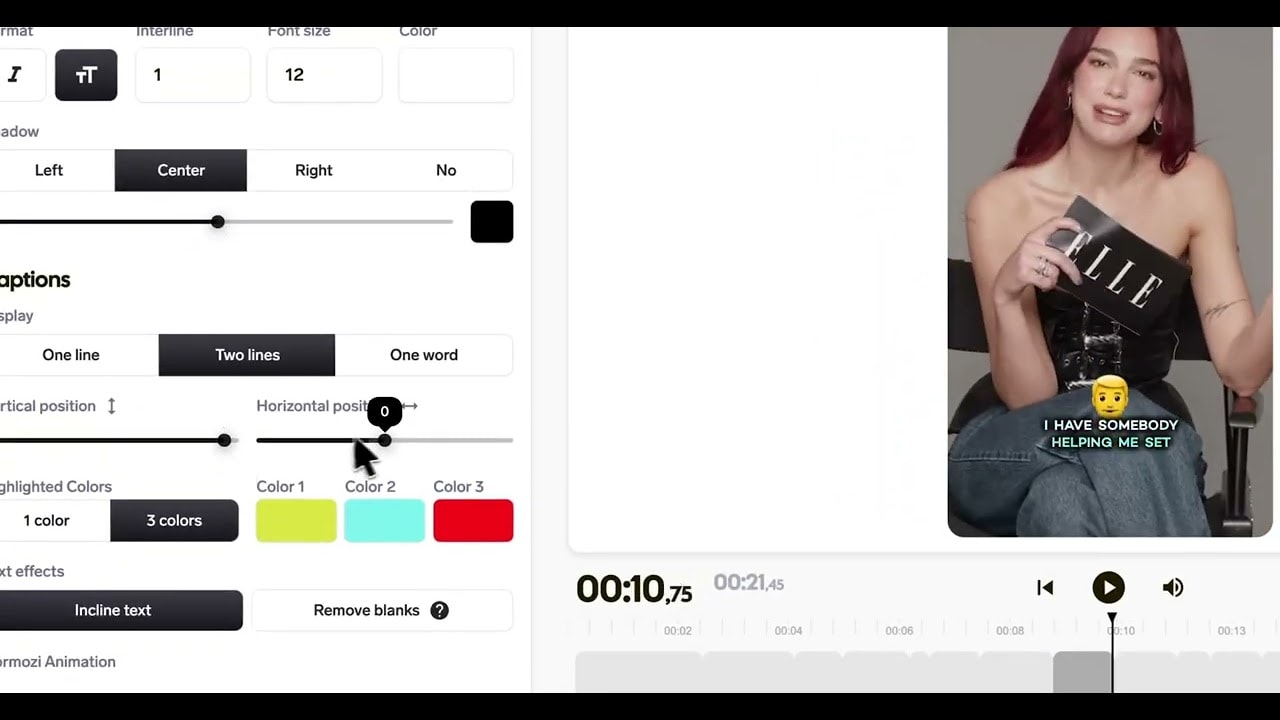
Key Features
- Long video to shorts: AI picks the best moments (Professional and up)
- Animated captions in 100+ languages; the company claims 98%+ accuracy
- Magic B-roll, zooms, AI hook titles, silence cutting and noise reduction
- AI voice-over and auto-translated captions on Professional and up
- Full editor with timeline, custom fonts, B-roll and sound-effect library
- Scheduler and content calendar for TikTok and YouTube
- Faceless videos, TikTok slideshows, AI avatars and photo to video
- MCP endpoint and REST API for AI agents and automation tools
How the Workflow Runs
- Import a file or paste a YouTube link.
- On Professional or Business, let the AI find the best moments in a long video.
- Pick a caption style and tweak it in the editor.
- Add B-roll, a hook title, a voice-over or translated captions.
- Export, or schedule the short to TikTok or YouTube.
Using SendShort From an AI Agent
SendShort publishes an MCP endpoint at mcp.sendshort.ai that exposes four tools to an assistant: import a video, find moments, add captions and render a clip. That lets Claude, ChatGPT, Cursor, Grok Bot or an automation tool such as n8n or Zapier run the whole job from a chat or a script, and a REST API covers programmatic YouTube import and clipping.
One thing to check before you pay: the pricing page lists the AI Agent and API on the Professional plan, while the homepage says Business. Confirm which plan includes it for your use. Agents also spend credits and act on your account, so review what they render before you publish.
SendShort Pricing (2026)
| Plan | Billed yearly | Billed monthly | Shorts a month | Longest short | Highlights |
|---|---|---|---|---|---|
| Starter | $15/mo | $19/mo | 20 | 90 seconds | Captions in 100+ languages, full editor, scheduler, 1080p, no watermark |
| Professional | $23/mo | $29/mo | 50 | 3 minutes | Long video to shorts, auto B-roll, AI hook titles, AI voice-over, translation, AI Agent and API, up to 2K |
| Business | $47/mo | $59/mo | Unlimited | 10 minutes | Unlimited long-to-shorts, 4K at 60 fps, 9:16, 1:1 and 16:9, 10 automated series |
The pricing page lists no free plan, and every plan says you can cancel anytime. If you want to try it, you can start with SendShort here.
SendShort vs Klap vs Submagic
| SendShort | Klap | Submagic | |
|---|---|---|---|
| Entry price (billed yearly) | $15/mo | $14/mo | $12/mo |
| What the entry plan caps | 20 shorts a month, 90 seconds each | 100 clips a month | 45 credits, about 15 videos |
| Built around | Clipping plus a full editor, scheduler and agent access | One-click long video to vertical clips | Captions, B-roll and repurposing |
Read the full comparison in Klap vs Submagic, or see the Best AI Tools to Turn Long Videos into Clips.
Pros and Cons
Where it holds up: the clipping, captions and editor sit in one place, the scheduler removes a separate posting tool, and the MCP endpoint and API let an AI agent run the job. Captions cover 100+ languages, and Professional adds translation and AI voice-over.
Where it falls short: long video to shorts, auto B-roll and the agent features are locked behind the Professional plan or higher, and Starter caps you at 20 shorts a month and 90 seconds each. There is no free plan, so you pay before you can test the full workflow, and the lowest prices need yearly billing.
Who Should Skip This
If you only need subtitles on a video you already edited, a cheaper caption-only tool covers it. If you clip rarely, a monthly plan will sit unused. And if you want a permanent free tier to experiment with, SendShort does not list one, so look at the free plans in our Best AI Tools With a Free-Forever Plan collection.
Similar Tools Available on AIFind
For one-click clipping, see Klap and OpusClip. For captions, B-roll and repurposing, see Submagic. For clipping with social scheduling, see quso.ai. Browse the Best AI Tools for Short-Form Video and Best AI Tools With MCP for Claude and ChatGPT collections.
FAQ
Does SendShort have a free plan? The pricing page lists none. Plans start at $15 a month billed yearly ($19 billed monthly), and you can cancel anytime.
Which plan do I need to turn long videos into shorts? Long video to shorts, where the AI picks the best moments, starts on the Professional plan at $23 a month billed yearly.
Can I use SendShort from Claude or ChatGPT? Yes. It offers an MCP endpoint and an API for assistants and automation tools. The pricing page places this on Professional while the homepage says Business, so confirm before buying.
Which platforms can it schedule to? The built-in scheduler and content calendar cover TikTok and YouTube, with unlimited social accounts.
What video formats can I export? 9:16, 1:1 and 16:9, from 1080p on Starter up to 4K at 60 fps on Business.
This page may contain affiliate links — AIFind may earn a commission if you sign up through them, at no extra cost to you. See our affiliate disclosure for details.

Paul
Founder & Editor, AIFind
Paul is an experienced Human Resources professional with a background in applying technology, data analytics, and workflow optimization to HR management. Outside his corporate HR career, he's a seasoned content creator and digital entrepreneur: he built a YouTube channel to 60,000+ subscribers over 10 years, ran a print-on-demand e-commerce business on platforms like GearBubble, and actively uses AI tools and automation in both his own projects and enterprise work — the hands-on experience behind AIFind's tool research and reviews.